Project management · Alternatives with real prices
Asana alternatives when the free plan stops at 2 users
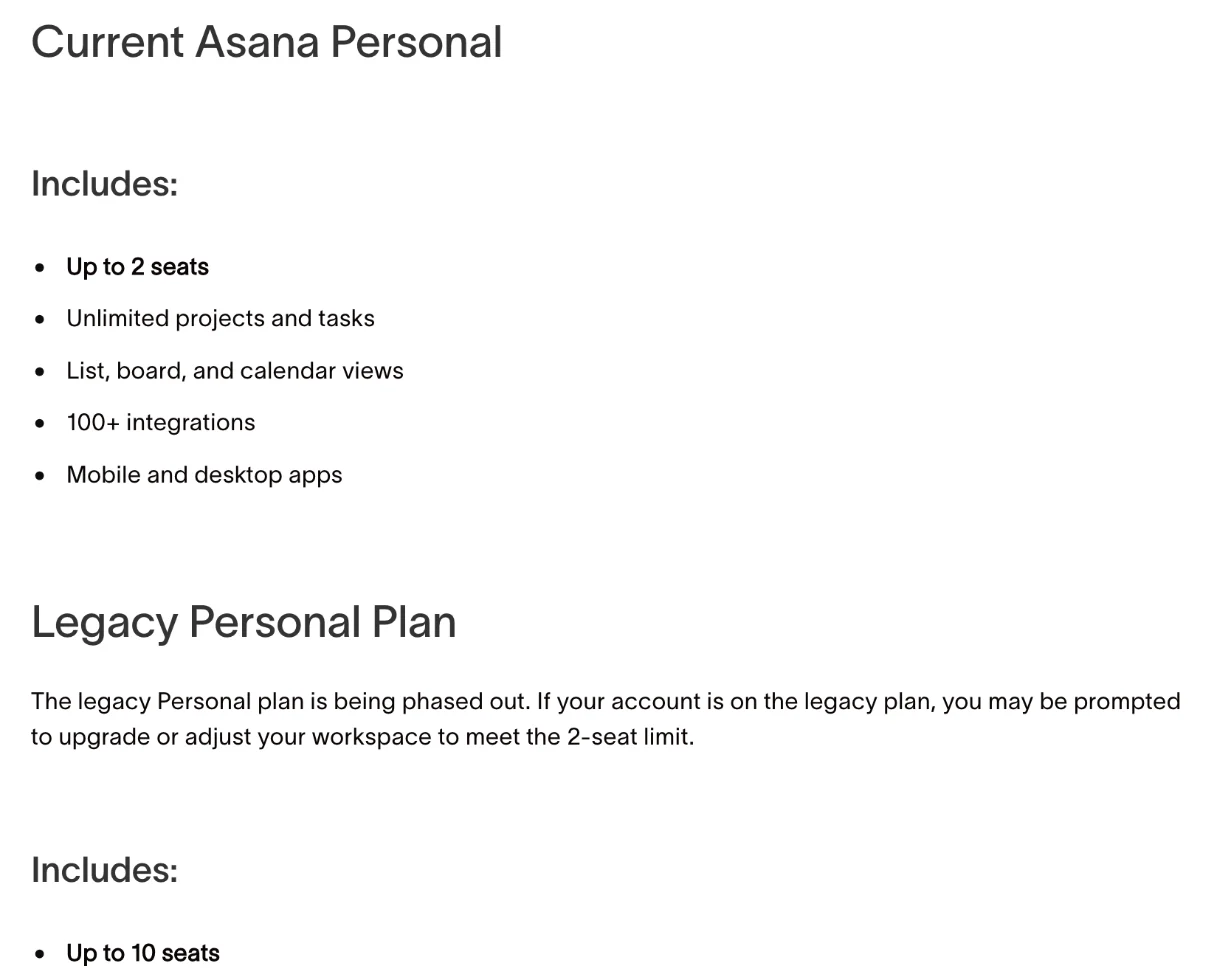
Asana Personal is free for 2 users. From 6 to 30 users, paid plans come in steps of 5, so a team of 6 pays for 10. Each alternative below lists its plans, free plan and catch.
Asana Personal is free for 2 users. The older free plan for up to 10 is being phased out. A team of 3 has to pay from the start.
Said in: Asana pricing page and help center, read 28 Nov 2026.
From 6 to 30 users, the bill grows in steps of 5
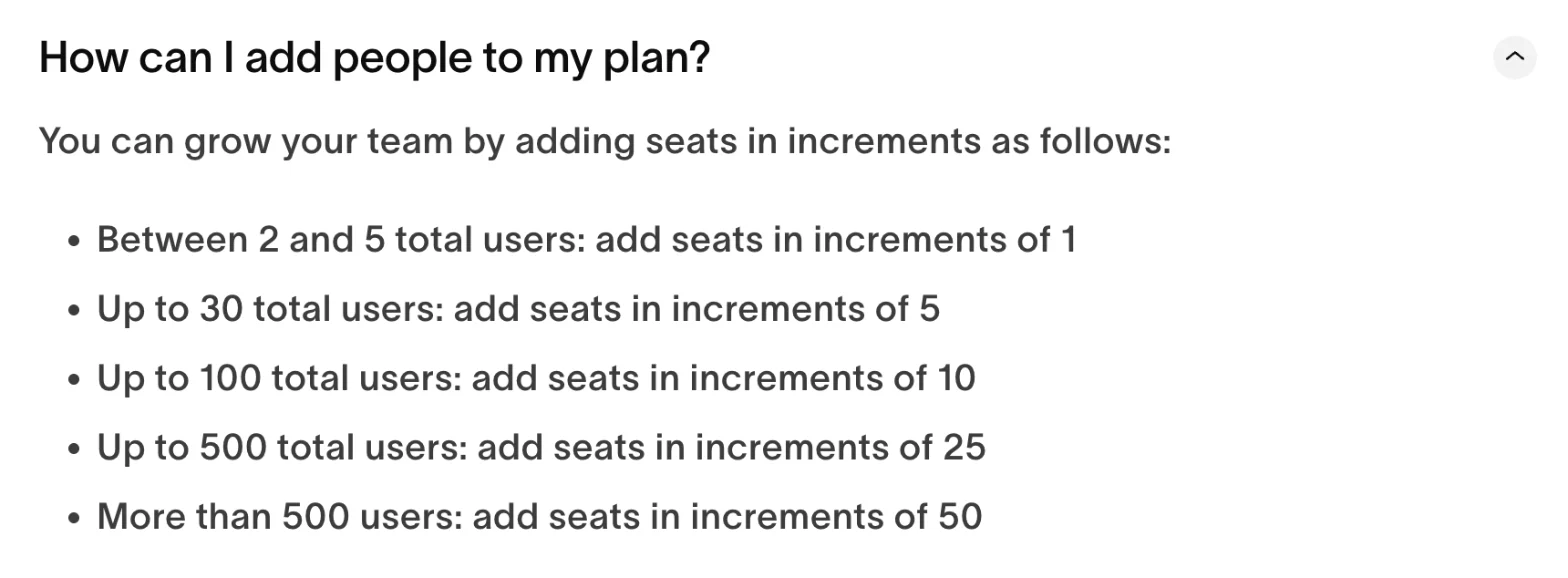
Asana sells paid users one at a time up to 5 users, then in steps of 5 up to 30. A team of 6 pays for 10 users. monday.com and Wrike sell users in set sizes too.
Said in: Asana pricing page, question on adding people, read 28 Nov 2026.
The useful extras sit on a pricier plan
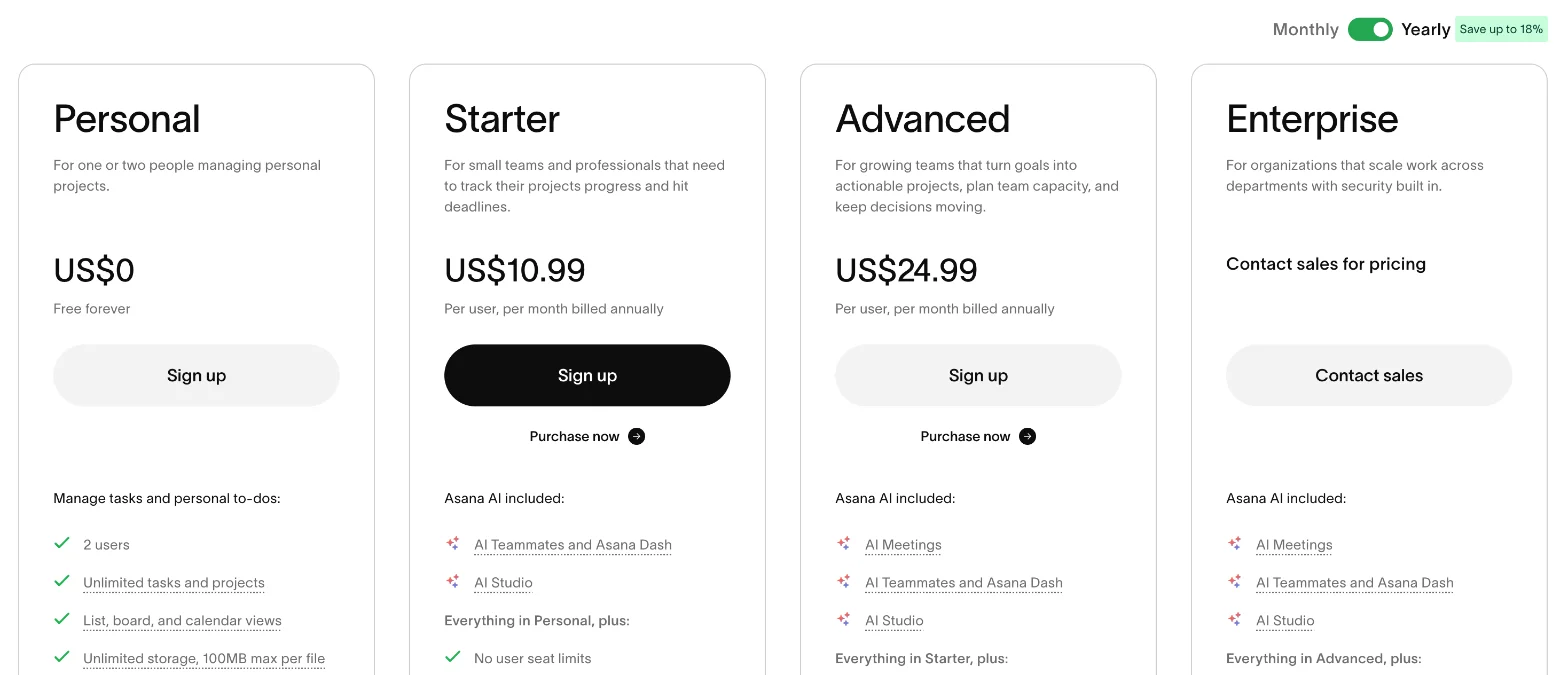
A product owner wrote in Nov 2026 that portfolios and workload tracking need Advanced. Advanced costs $24.99 for each user, each month, paid yearly. Starter costs $10.99 on the same terms.
Said in: Capterra reviews of Asana, posted Nov 2026, read 28 Nov 2026.
Too many alerts and a slow start
One project manager wrote in Jun 2026 that Asana needs strict team rules. Without them, tasks and alerts pile up. A sales director wrote in Sep 2026 that every comment sends an email by default. A team lead wrote in Nov 2026 that new users find the screens complex.
Said in: Capterra reviews of Asana, posted Jun, Sep and Nov 2026, read 28 Nov 2026.
Cost check
Compare what Asana costs with an alternative
Asana is set as your current tool, and its 9 alternatives fill the list. Change the plan, billing or team size to see the difference over 12 months.
Asana pricing: what you pay now
Asana Starter costs $10.99 for each user, each month, when you pay for the whole year. Month to month, Starter costs $13.49 for each user, each month. Advanced costs $30.49 for each user, each month.
Plan
Month to month
Pay for the whole year
Limits and notes
Personal
Free
Free
2 users; up to 2 users in each project and team
Unlimited storage, 100MB max per file
List, board and calendar views only
No timeline/Gantt, workflow builder or automation rules, reporting dashboards, forms, Asana AI or AI Studio
Starter
$13.49each user, each month
$10.99each user, each month$131.88 a year for each user
Minimum subscription is 2 users; users sold in fixed sizes
AI Teammates, Asana Dash and AI Studio included
No cap on the number of users
Timeline and Gantt views
Advanced
$30.49each user, each month
$24.99each user, each month$299.88 a year for each user
Minimum subscription is 2 users; users sold in fixed sizes
Everything in Starter
AI Meetings
Unlimited portfolios
Enterprise
Not published
Not published
Everything in Advanced
SAML authentication
User provisioning with SCIM
Universal resource management
Enterprise+
Not published
Not published
Available for advanced security and compliance
Full organization export (JSON) via admin console or API; Enterprise+ and Legacy Enterprise
Asana pricing page with yearly billing selected, read 28 Nov 2026.
Paid plans start at 2 users, and Asana sells no plan for 1 user. From 2 to 5 users, you add 1 user at a time. Above 5 users, plans grow in steps of 5 up to 30 users. Later steps are 10 up to 100, 25 up to 500, then 50.
In organizations, teams and divisions, guests are free and do not count toward the bill. In workspaces with no shared email domain, everyone counts, guests included.
Extra AI requests cost $0.50 each when prepaid, or $0.60 each on demand. On demand use is paid monthly, with a spending cap set by an admin.
Timesheets and Budgets is a separate paid add on for Starter, Advanced, Enterprise and Enterprise+. It comes with a 14 day self serve trial.
Asana pricing page, question on adding people, read 28 Nov 2026.
The main catch: Paid plans start at 2 users, and Asana does not sell a plan for 1 user.
Every card shows the starting price, free plan, trial and catch from the vendor’s own pages.
Must have
Showing all 9 tools
ClickUp
Best for: Teams that want tasks, docs and chat in one Workspace
Free plan
Starts at
From $9for each user, each month, paid yearly
Paying monthly
$12 for each user
Free plan
Yes, no user cap
Free trial
Not stated
Imports from Asana
Built in app importers from the Import page
Works on
Web, Windows, Mac, Linux, iOS, Android
The catchEvery member of the Workspace must be upgraded, and Dashboards stay trial only before Business.
Shared with AsanaBoard viewTimeline viewAutomationsDocs and wikiDatabasesReportsAI assistantTime trackingForms
Source: ClickUp pricing and help pages.
monday.com
Best for: Teams of 3 or more planning work on shared boards
Free plan
Starts at
From $9for each user, each month, paid yearly
Paying monthly
Not published
Free plan
Yes, up to 2 users
Free trial
14 days
Imports from Asana
Not stated
Works on
Web, iOS, Android
The catchPaid plans come in set team sizes of 3, 5, 10, 15 and up. Automations start on Standard.
Shared with AsanaBoard viewTimeline viewAutomationsDocs and wikiReportsAI assistantTime trackingForms
Source: monday.com pricing and help pages.
Smartsheet
Best for: Teams that plan projects in sheets and Gantt charts
Free trial
Starts at
From $9for each user, each month, paid yearly
Paying monthly
$12 for each user
Free plan
No
Free trial
30 days
Imports from Asana
Not stated
Works on
Web, iOS, Android
The catchPro is only for new customers and stops at 10 Members, so growing teams need Business.
Shared with AsanaBoard viewTimeline viewAutomationsDatabasesReportsAI assistantFormsTime tracking
Source: Smartsheet pricing and help pages.
Jira
Best for: Teams that track projects on boards, backlogs and timelines
Free plan
Starts at
From $9.70for each user, each month, paid monthly
Paying monthly
$9.70 for each user
Free plan
Yes, up to 10 users
Free trial
7 days
Imports from Asana
Direct import through the new import experience into a business or software space
Works on
Web, iOS, Android
The catchThe Free plan stops at 10 users, makes every user an admin and has no Rovo AI.
Shared with AsanaBoard viewTimeline viewAutomationsReportsAI assistantFormsTime tracking
Source: Jira pricing and help pages.
Linear
Best for: Product teams planning work in issues, projects and docs
Free plan
Starts at
From $10for each user, each month, paid yearly
Paying monthly
Not published
Free plan
Yes, no user cap
Free trial
Not stated
Imports from Asana
Dedicated importer in the product (workspace admins only)
Works on
Web, Mac, Windows, iOS, Android
The catchThe free plan stops at 250 issues, and guests need Business or Enterprise.
Shared with AsanaBoard viewTimeline viewAutomationsDocs and wikiReportsAI assistantForms
Source: Linear pricing and help pages.
Wrike
Best for: Teams from 2 to 15 users who need Gantt charts
Free plan
Starts at
From $10for each user, each month, paid yearly
Paying monthly
Not published
Free plan
Yes, no user cap
Free trial
14 days
Imports from Asana
Not stated
Works on
Web, Windows, Mac, Mobile
The catchUsers come in groups of 5 up to 30, and paid plans have no month to month price.
Shared with AsanaBoard viewTimeline viewAutomationsReportsAI assistantTime trackingForms
Source: Wrike pricing and help pages.
Airtable
Best for: Teams building shared databases, forms and simple apps
Free plan
Starts at
From $20for each user, each month, paid yearly
Paying monthly
$24 for each user
Free plan
Yes, up to 5 users
Free trial
14 days
Imports from Asana
Not stated
Works on
Web, Mac, Windows, iOS, Android
The catchFree bases stop taking new records at 1,000, and Team bases stop at 50,000.
Shared with AsanaBoard viewTimeline viewAutomationsDatabasesReportsAI assistantForms
Source: Airtable pricing and help pages.
Trello
Best for: Small teams that want simple visual boards for tasks
Free plan
Starts at
From $5for each user, each month, paid yearly
Paying monthly
$6 for each user
Free plan
Yes, up to 10 users
Free trial
14 days
Imports from Asana
Not stated
Works on
Web, Windows, Mac, iOS, Android
The catchTimeline and Dashboard views need Premium, and each Workspace is billed separately.
Shared with AsanaBoard viewTimeline viewAutomationsReportsAI assistant
Source: Trello pricing and help pages.
Basecamp
Best for: Small teams and agencies that want one simple project hub
Free plan
Starts at
From $29each month, paid monthly
Paying monthly
$29
Free plan
Yes, up to 3 users
Free trial
30 days
Imports from Asana
Not stated
Works on
Web, Windows, Mac, iOS, Android
The catchClients count toward user limits, and unlimited users needs Pro Unlimited, paid for the whole year.
Shared with AsanaBoard viewTimeline viewDocs and wikiReportsTime tracking
Source: Basecamp pricing and help pages.
No alternative matches every filter.
Remove a filter to see more tools.
Leaving Asana: take your data with you
Projects, saved searches and My Tasks export as CSV or JSON. A project view can be saved as a PDF through the browser print dialog. A full organization export comes as JSON only, on Enterprise+ and Legacy Enterprise.
What Asana lets you export
Projects, saved searches and My TasksCSV, JSONAsana help center
Project or My Tasks printoutPDF (via Print > Save as PDF)Asana help center
Full organization exportJSON only (CSV not possible)Asana help center
Alternatives that import Asana data
ClickUpBuilt in app importers from the Import page
JiraDirect import through the new import experience into a business or software space
LinearDedicated importer in the product
Asana alternatives: questions people ask
Is Asana free anymore?
Yes, for 2 users. Asana Personal is free for 2 users and includes list, board and calendar views. Timelines, automation rules, forms and dashboards need a paid plan.
What is the cheapest alternative to Asana?
Trello costs the least to start. Trello Standard costs $5 for each user, each month, when you pay for the whole year. Asana Starter costs $10.99 on the same terms.
Is there a free alternative to Asana?
Yes. 8 of the 9 alternatives on this page have a free plan. ClickUp, Linear and Wrike set no user cap on theirs. Jira is free for up to 10 users.
Why do teams look for Asana alternatives?
The free plan stops at 2 users. From 6 to 30 users, paid plans are sold in steps of 5. Capterra reviews also mention price jumps between plans and too many notifications.
Can I move my projects from Asana to another tool?
Yes. Asana exports projects as CSV or JSON. ClickUp, Jira and Linear each have an importer for Asana data.
Which Asana alternative is closest to Asana?
ClickUp shares the most features with Asana on this page. Its Timeline view needs the Business plan. ClickUp Business costs $17 for each user, each month, when you pay for the whole year.